

Running a billing platform is not just about sending invoices and taking payments. Once the business starts to grow, you need to know what is actually happening.
Which services are bringing in recurring revenue? Which invoices are overdue? Are customers growing or slowing down? Who has access to the system? Are VAT checks being handled properly?
Those questions should not require exports, spreadsheets, or guesswork.
That is why we have added a new reporting system to BillingServ. It gives hosting providers, SaaS businesses, VPN providers, agencies, and service companies a clearer view of revenue, customers, and compliance from inside the admin panel.
If you use BillingServ to manage subscriptions, invoices, customers, packages, and payments, the new reports give you a more practical way to understand the business behind the billing.
Three reporting pages, built around how billing teams work
The new reporting area is split into three sections:
- Financial Performance
- Customer & Growth Insights
- Compliance & Audit
Each page focuses on a different set of questions. The idea is simple. Financial data, customer data, and compliance data should not all be mixed together in one noisy dashboard.
You can check the numbers you need, then move on.
Financial Performance
The Financial Performance report is built for the questions most billing teams ask first.
- What is our monthly recurring revenue?
- How much annual recurring revenue do we have?
- How healthy are invoices this month?
- Which packages are bringing in the most booked value?
- Which subscriptions are helping or hurting MRR?
This page includes revenue metrics, invoice health, revenue trends, package performance, and a subscription revenue breakdown. It is useful when you want to understand cash flow, recurring income, and where revenue is coming from.
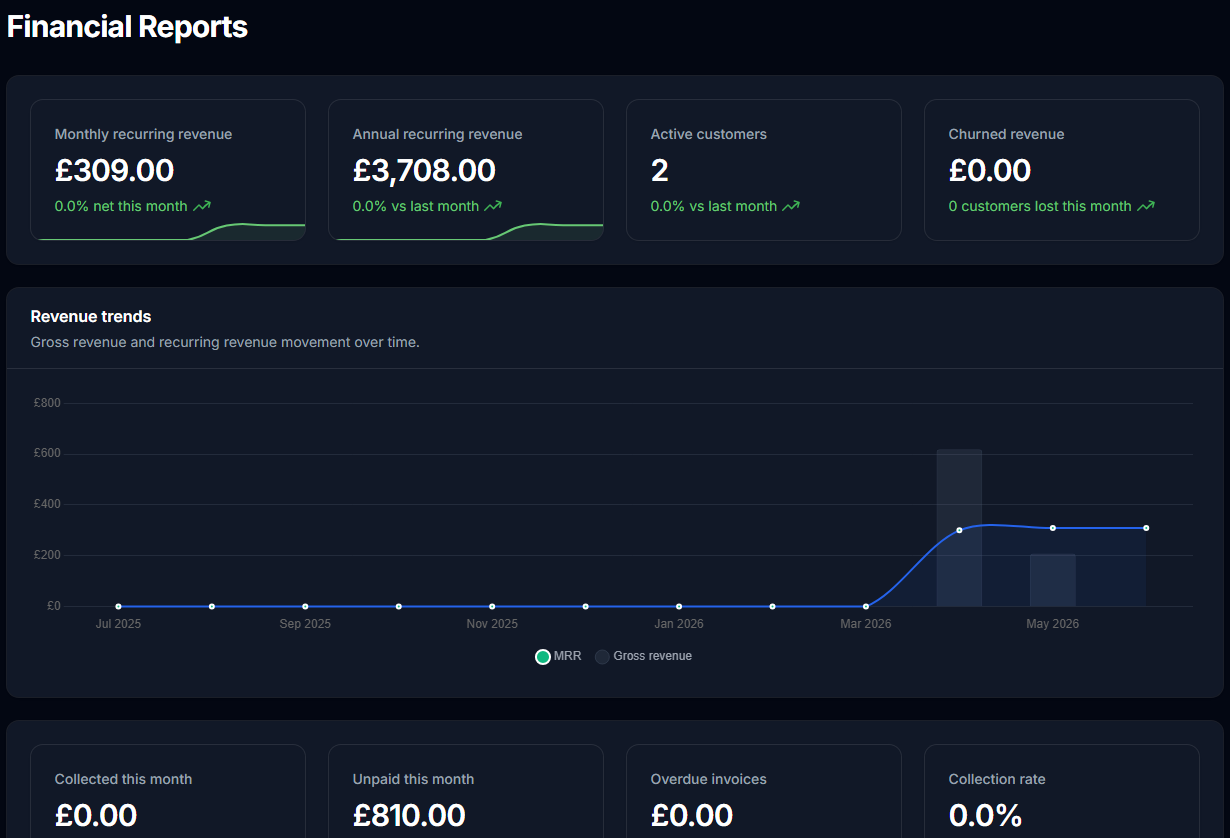
For businesses selling hosting, VPN access, software subscriptions, support packages, or other recurring services, this makes it easier to see what is happening without pulling the numbers apart manually.
It also helps with package decisions. If one package has a lot of customers but weak recurring revenue, you can spot it. If another package has fewer customers but stronger booked value, that becomes easier to see too.
Customer & Growth Insights
Revenue matters, but it is only part of the story. Customer movement matters too.
The Customer & Growth Insights page gives you a clearer view of your customer base. It includes total customers, active customers, new customers, churn, ARPU, top customer concentration, customer growth trends, and a customer performance table.
That helps answer questions like:
- Are we adding customers faster than we are losing them?
- How much recurring revenue does the average customer bring in?
- Are a few customers carrying too much of the revenue?
- Which customers have the strongest active order value?
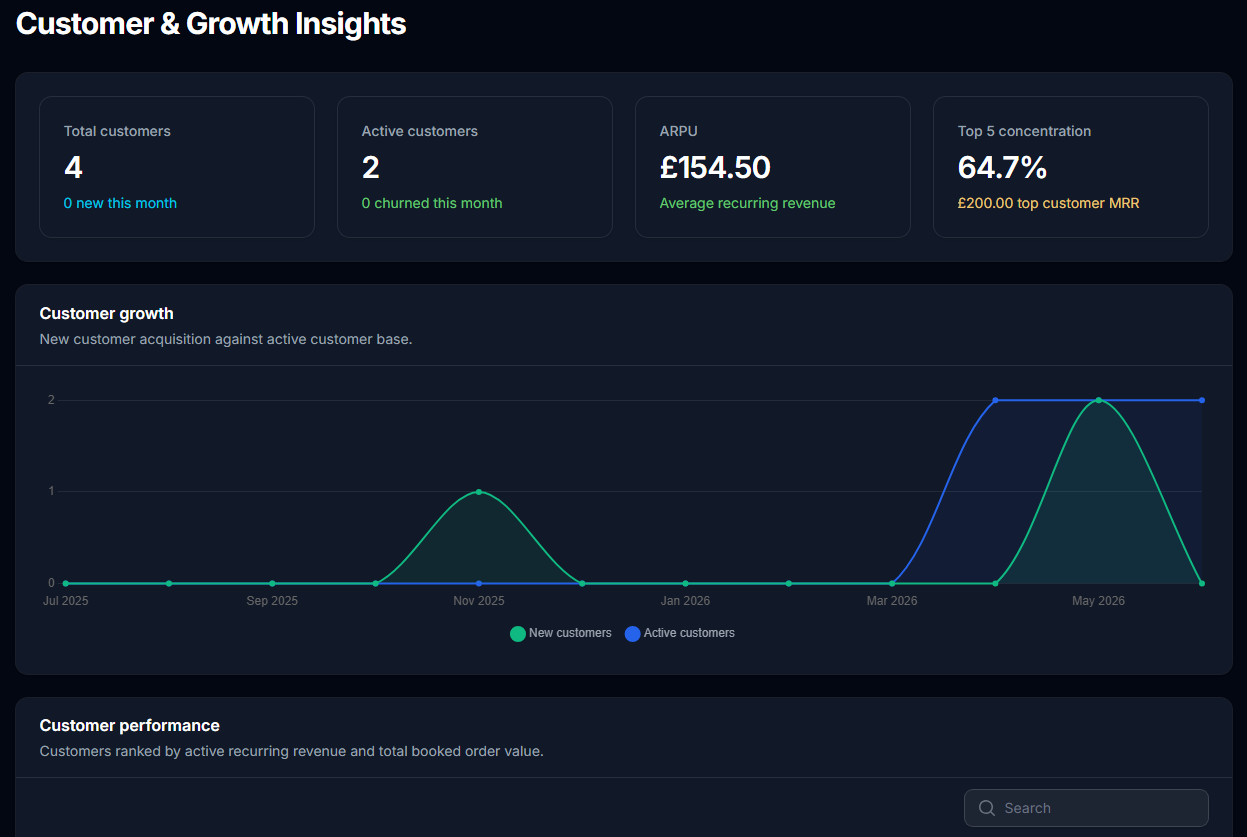
This is useful for spotting growth patterns early. A business can look healthy because revenue is up, but still have a weak customer base if churn is rising or too much revenue depends on a small number of accounts.
Customer reporting gives you another angle. It helps you see whether growth is broad, stable, and repeatable.
Compliance & Audit
The Compliance & Audit report focuses on the operational side of billing.
It includes VAT validation metrics, invalid VAT checks, staff users, staff 2FA coverage, staff sales performance, and a VAT validation log. That gives admin users a better way to check access, validation activity, and sales handling in one place.
This is especially helpful for teams that need to keep tighter control over billing records, VAT handling, and staff access.
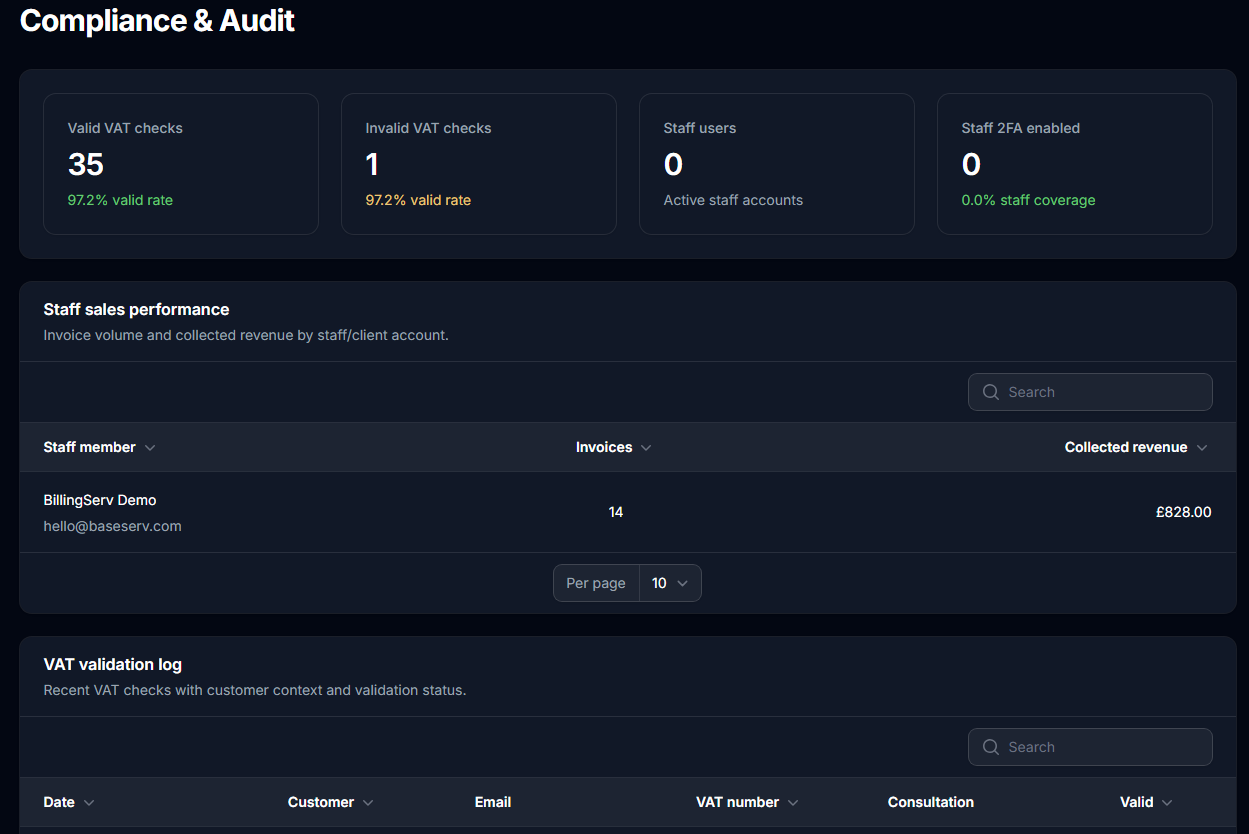
Compliance reporting does not need to be complicated to be useful. Sometimes the most helpful thing is having the right checks visible without digging through separate areas of the system.
Why this matters for recurring billing businesses
Recurring billing creates a lot of moving parts. Customers sign up, renew, upgrade, cancel, pay late, change packages, and contact support. If those details are spread across different areas, reporting becomes harder than it needs to be.
The new BillingServ reporting system helps bring those signals together.
- Financial reports help you understand recurring revenue and invoice health.
- Customer reports help you understand growth, churn, and customer value.
- Compliance reports help you keep an eye on VAT checks, staff access, and audit activity.
That makes it easier to run the business day to day. It also makes it easier to make decisions without waiting until the end of the month to build a spreadsheet.
Built into BillingServ
The reporting system is built directly into BillingServ. You do not need a separate analytics tool to see the basics of how your billing operation is performing.
That matters because billing data is already inside the platform. Orders, invoices, customers, packages, transactions, VAT checks, and staff activity are all connected. The reports use that data to give you a clearer picture of what is happening.
For businesses that run on subscriptions and recurring payments, that visibility can save time and reduce the number of small problems that go unnoticed.
Who this helps
The new reports are useful for:
- hosting providers tracking recurring service revenue
- VPN providers managing subscription customers
- SaaS businesses monitoring invoice health and churn
- agencies selling retainers, hosting, or support packages
- service companies that need better billing visibility
If your business depends on recurring revenue, customer retention, and clean billing records, reporting should be part of the billing system rather than an afterthought.
Final thought
Better reporting does not replace good business judgment. It gives you the information you need to use that judgment sooner.
With the new reporting system in BillingServ, you can see revenue, customer growth, invoice health, VAT activity, and staff access in one place. That gives you a clearer view of the business and fewer reasons to rely on manual checks.
If you are already using BillingServ, you can find the new reports in the admin panel under Reports.
If you are comparing billing software for a recurring revenue business, this is another reason to look at BillingServ as more than an invoicing tool. It is built to help you manage the operational side of subscriptions, customers, payments, and reporting together.